


Back in December 2020 Microsoft pulled its documentation on the Enhanced Security Admin Environment and replaced it with the Enterprise Access Model, which describes the same principles but with some amount of vagueness. If you wanted Microsoft's idea of an OU layout and GPOs to go with it, you were left working from archived copies for the next 5 years. That changed in May 2026, when Microsoft added the AD DS tier model back to Learn and released a reference implementation you can deploy.
This is the first of two posts on tiering. In this we'll look at Active Directory, and the next will cover how to implement it in Entra ID. The guidance will draw on Microsoft's own tier model, the roadmap SpecterOps and Teal put together, and our own experience. Everything described here can be done with features available in Active Directory today, so there's strictly no need for a commercial Privileged Access Management tool.
The rule behind both models
Active Directory tiers describe control of your on-premises directory, whereas the Entra tiers describe control of your tenant. They're separate models, and the same person can sit at a different tier in each. However, there's a common rule they both follow.
Control flows down, and credentials never do:
-
A higher tier can administer a lower one.
-
A lower tier can never gain control of a higher one.
- A tier's credentials are never typed into, cached on or exposed to anything below it.
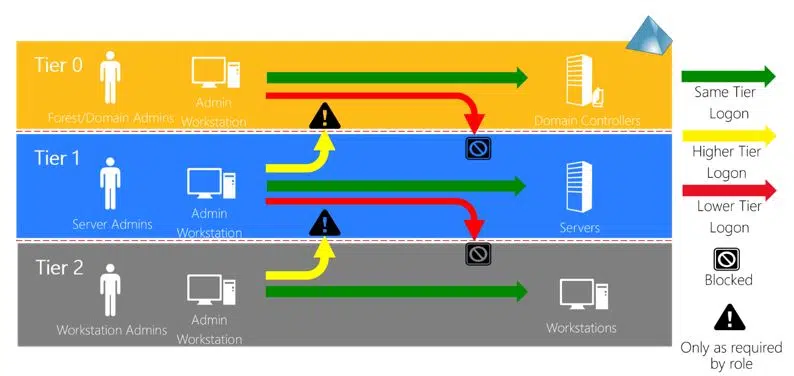
Figure 1: Restricting cross-tier logins.
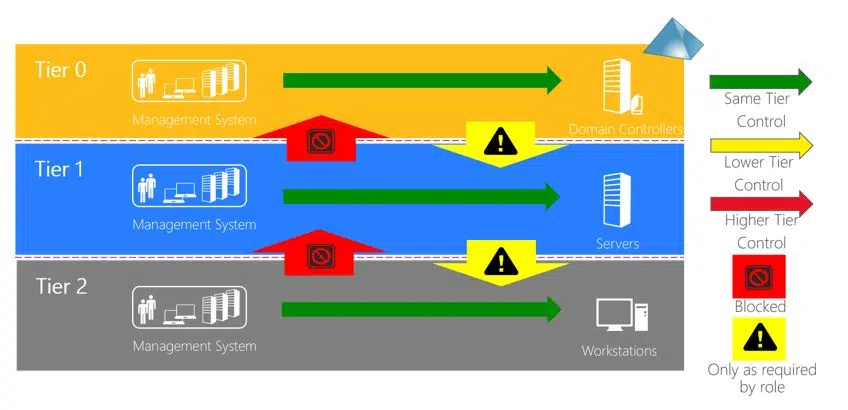
Figure 2: Restricting cross-tier object control.
We often see admins struggling with that last part. They don't understand why they shouldn't use a Domain Admin account on a member server they already have complete control of, and that's partly from not being aware of the credential theft techniques that rely on it. Once credentials are exposed to a server, anyone with local admin rights there can dump them, and reuse them to control Tier 0. Microsoft's updated guidance makes the same point when it says the keyboard (and not the destination) sets the trust level of a session.
The rule applies between Active Directory and Entra, too. No account, role or management path should give anyone control of the other. The sync server is the one link between them a hybrid environment can't avoid, meaning it's Tier 0 on both sides.
Working out what's Tier 0
Tier 0 is anything with direct or indirect control of the directory. Domain controllers, AD CS root and issuing CAs, AD FS and Entra Connect are already well known. What most admins are unaware of is indirect control, and requires looking at what can touch your domain controllers without being in a privileged group:
-
Who has control of your hypervisor? They can image your running domain controllers.
-
Who has control of your backup solution? They hold your domain controllers' system state.
-
Who can reset the service account passwords of your backup software? They operate with Domain Admin rights (but shouldn't).
- What can run code on your domain controllers? EDR, RMM and patching all run there as SYSTEM.
- Who can change the ACL on an OU above your domain controllers? They can add an inheritable ACE, and it will land on every Tier 0 object below that hasn't blocked inheritance.
All of these are effectively Tier 0, as are the built-in operator groups (Account Operators, Backup Operators, Print Operators and Server Operators). If you're unsure about what should be in Tier 0, SpecterOps maintain a table of Tier 0 assets for both directories. It explains why each entry is or isn't Tier 0, and whether there's a known technique for abusing it.
Microsoft has also described the patterns that break the tier model, which we see time and time again in engagements. The one we come across most frequently is service accounts with Domain Admin membership running on member servers. Because they aren't tied to a person, they tend to get less scrutiny than an admin's own account. Many software vendors also make the problem worse by telling you to operate under Domain Admin instead of the minimum permissions they need. Microsoft suggests a target of fewer than 5 people with Domain Admin equivalent rights, and no service accounts with that level of privilege at all.
Enforcing the boundary
Start with an OU structure that mirrors your tiers, and keep accounts, computers and groups separate inside each one. By itself this does not serve as a mitigation of anything, but it does create the groundwork for clean GPO application and make an object's tier obvious from where it sits. An admin can see for themselves that a change would break the model without having to ask anyone.
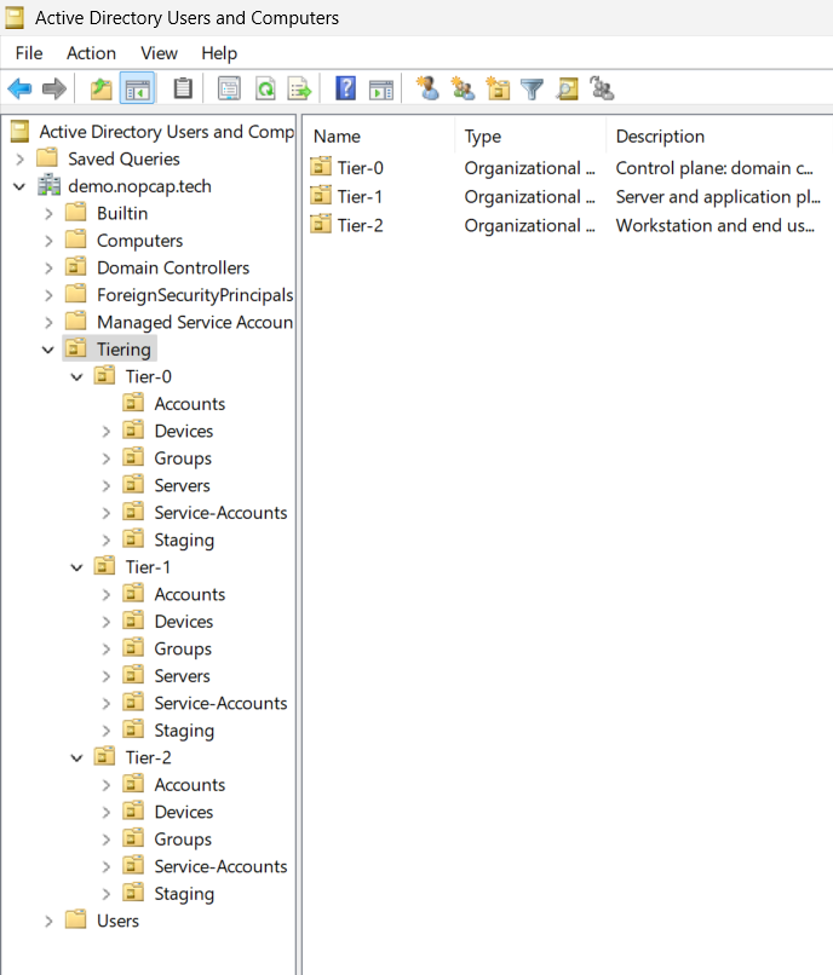
Figure 3: Source - ADTierKit
Group Policy is what enforces the tiers. Follow Microsoft's guidance on this, with an account restrictions GPO for each tier. That GPO denies all 5 logon rights to the admin, operator and service groups from every other tier, including Tier 0 groups like Domain Admins:
-
Deny log on locally
-
Deny access to this computer from the network
-
Deny log on as a batch job
-
Deny log on as a service
-
Deny log on through Remote Desktop Services
Another policy at the domain root covers anything that isn't in a tier OU, and is filtered so it never applies to domain controllers. A deny always overrides an allow, and that's what stops a Domain Admin signing in to a Tier 1 server, whatever the local groups on that server say.
Only deny privileged groups. Never deny standard users, as they need network logon to file servers and to every domain controller for Group Policy and logon scripts. Domain controllers shouldn't get any deny entries at all. Keep their default user rights assignments in the Default Domain Controllers Policy, which already limits interactive sign-in to Administrators and the built-in operator groups. As any PingCastle audit would tell you: make sure those groups are left empty.
Stopping a lower tier from administering a higher one is a bit different, and is done through group membership and permissions on each tier's OUs and GPOs. Use Restricted Groups to set local Administrators membership for the computers in each tier OU. This ensures your Tier 2 groups never end up as local admins on a Tier 1 server. If a local admin adds someone anyway, they're removed when Group Policy reapplies security settings (16 hours by default).
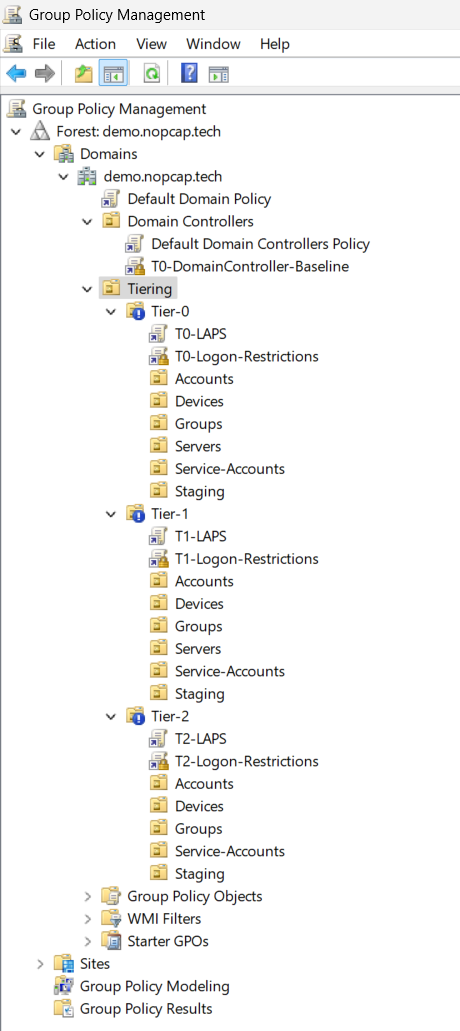
Figure 4: Source - ADTierKit
Group Policy still runs on the server itself though, meaning a local admin there can stop it applying. If they remove the deny rights, a Tier 0 account can sign in to that server again. Authentication policies and silos can help with this. The domain controller evaluates them when it issues tickets, so a Tier 0 account can't sign in anywhere you haven't allowed, regardless of local server policy. They need Kerberos armouring, and there are two limits: an account can only be in one silo at a time, and the built-in Administrator account is always exempt. We've had success implementing them at Tier 0 but have found it challenging to expand past that.
To stop insecure NTLM, DES and RC4 being used by Tier 0 accounts, and to prevent their credentials being cached, add your Tier 0 accounts to the Protected Users group - but never service or computer accounts. Audit for use of legacy authentication by the accounts first or expect complaints from your admins when they're locked out of the domain.
Windows LAPS belongs on every tier, including your Tier 0 member servers. It's not widely known but it can also manage the DSRM password on domain controllers, providing password encryption is enabled. Make sure you know who has access to those passwords, because if your Tier 2 helpdesk analyst can pull the local administrator password for a Tier 1 server, you've just broken your tier model. Grant read access per tier OU, to that tier's admins only, and audit it. Turn on password encryption and set the authorised decryptor for each tier (by default this is Domain Admins).
Tier 1 is where it gets tricky. There are too many combinations of role, application and environment for a single set of GPOs to cover. Appliances that authenticate against AD, like storage arrays and ESXi hosts, don't process Group Policy or they only honour a small part of it. This is usually where a rollout stalls after Tier 0. Reduce the number of distinct Tier 1 admin roles until what's left is something Group Policy can handle.
Time-bound group membership
While tiering limits where people can use their privilege, taking standing privilege away limits how long they hold it. Active Directory can do time-bound group membership out of the box, through the Privileged Access Management optional feature. Most articles on it reference Microsoft Identity Manager, but you don't need MIM, a bastion forest or anything else to use it. What you do need is a Windows Server 2016 forest functional level. Like the Recycle Bin, you can't turn it off once it's on, so only enable it when you're ready to commit.
Enable-ADOptionalFeature 'Privileged Access Management Feature' -Scope ForestOrConfigurationSet -Target 'contoso.com'
Once it's enabled, you can add someone to a group with a time to live. Then, check how long they have left:
Add-ADGroupMember -Identity 'Tier1-ServerAdmins' -Members 'T1-JSmith' -MemberTimeToLive (New-TimeSpan -Hours 2)
Get-ADGroup 'Tier1-ServerAdmins' -ShowMemberTimeToLive -Properties member
When the time to live runs out, the domain controller removes the membership. The KDC also won't issue a TGT that lasts longer than the shortest TTL the account holds, so a ticket can't outlive the membership behind it. Existing sessions are a different matter and keep their token (group and all) until the user signs out.
Unlike Entra ID's PIM, there's no workflow around any of this. You get no approvals, no MFA prompt and no record of why they elevated. All it does is limit how long someone holds a privilege. It does nothing about what they do with it, and 2 hours as a Domain Admin is plenty of time to establish persistently elevated rights. For this reason we'd recommend using it for Tier 1 groups, and keeping Tier 0 small enough that you can justify standing access.
Administrative Workstations
Always administer Active Directory from a workstation that matches the tier you're administering. A PAM solution or time bound group membership used from a Tier 2 laptop is not a substitute, nor is MFA. Your Tier 0 workstations should be domain joined and managed from your Tier 0 OU.
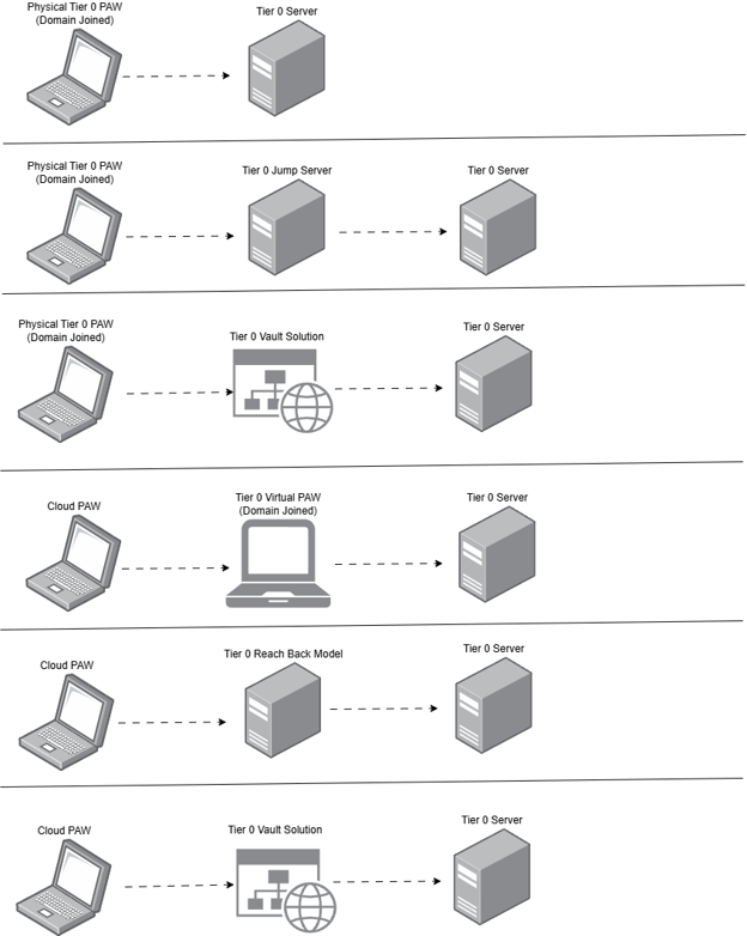
Figure 5: Source - Microsoft
You're not going to have every admin logging into a privileged access workstation tomorrow, but you can start with an admin server in your Tier 0 OU that you can RDP to. At least this gets your cached credentials off your laptop and onto a Tier 0 machine. But know that if the laptop is compromised, your admin session can still be observed. In the long run you want to build out your own workstations following Microsoft's privileged access device documentation.
Once your workstations are deployed, add them to your Tier 0 silo so your Tier 0 accounts can only get a TGT from them and your other Tier 0 assets. This will stop your admins using RDP to the admin server from their laptops. Don't allow your admins to RDP to your privileged access workstations either.
Order of Operations
Follow these steps in order and you will have fewer issues when rolling this model out to your organisation. Getting your admins to log into Tier 0 workstations won't mean much if you still have paths from your domain users to Tier 0. Here is how we approach tiering with our customers, using the SpecterOps and Teal roadmap:
- Logically tier your assets and start with Tier 0.
- Remediate any items you find that will give someone access to Tier 0. Build an attack path to each of your Tier 0 assets. While you could go through your group memberships, ACLs and local groups manually, leveraging the graph ability of BloodHound or PingCastle will produce more accurate results.
- Determine what will break when you apply your logon restrictions and add your Tier 0 accounts to Protected Users. Break out your service accounts so they only belong to one tier. Use gMSA, or dMSA if you have Windows Server 2025 DCs.
- Create your OUs, tier groups and GPOs. Verify what ACEs and GPOs are inherited before and after you move your objects. You will likely find some hard coded DNs in scripts and apps. Build your admin server so your admins have somewhere to work once the restrictions apply.
- Move your objects. Continue to fix paths that lead to Tier 0.
- Deploy your privileged access workstations and restrict your Tier 0 accounts to them. Change your Tier 1 groups to time bound membership.
Regularly retest and remediate your attack paths with the tools described above and Defender XDR's attack path management. Even with a proper tier model in place, you can still form paths to Tier 0, which is why the success of this hangs on your admins fully understanding the rationale behind tiering.