


Welcome to the final post in our State of Identity series. Earlier posts covered tiering Active Directory and Entra ID, who should have privilege and where they should be able to exercise it. This one focuses further along the kill chain, after authentication has succeeded.
There are currently three identity compromise techniques used in the wild that share similar fundamentals. All seek to coerce a legitimate token or cookie from a victim, then use it from somewhere you don't control. In past blogs we've already discussed device code phishing and AiTM in detail, so we won't dwell on the technicalities of either again. But as ConsentFix is a new kid on the block, we'll expand a bit more on it.
Considering the prevalence of these techniques, when planning this post we assumed a tenant with strong MFA, a decent Conditional Access baseline, and the full Defender Suite would offer coverage of them. Unfortunately, this wasn't the case, with the reason seemingly being that each attack splits authentication across two parties, and most controls only look at one of them.
What's actually being stolen
Entra ID is an OAuth 2.0 and OpenID Connect authorisation server. When a user authenticates they receive tokens, and from that point it's the tokens that grant access and not the password. A token is a bearer artifact by default, so whoever holds it is treated as the identity it was issued to. The three main types are:
- Primary Refresh Token (PRT, issued to the device)
- Refresh Token (RT, issued to an application)
- Short-lived Access Token (a Microsoft primer covers them)
Two properties are of most concern to the techniques in this post:
- Tokens carry the security state that was true at issuance. MFA claims, device compliance and authentication strength are baked in at the start, so a replayed token is itself proof that MFA and compliance were satisfied. Chris Brumm explains this in more depth.
- These tokens can be revoked. Well, most of them. Sign-in session tokens are revocable by design, and access tokens generally aren't unless the resource supports Continuous Access Evaluation. That's why revoking a session leaves already-issued access tokens live for up to an hour, and why Microsoft's EvilTokens guidance recommends temporarily disabling a compromised account rather than relying on revocation.
Which leg the control lands on
All three attacks split authentication across two parties. The victim does the interactive sign-in on their own device and network, satisfying every issuance-time control legitimately. The attacker does something later, from their own infrastructure, such as redeeming a code, polling for a token, or replaying a cookie. A Conditional Access control only helps if it's evaluated on the attacker's leg, and only if what it tests actually differs between the two legs:
- A device condition describes the device the victim signed in from. On the attacker's leg it either isn't re-evaluated at all (code redemption, cookie replay) or describes a device the attacker controls.
- A network condition describes where a request originates. On the attacker's leg that's their own infrastructure, which won't be on a compliant network. The same requirement passes for the victim and fails for the attacker.
- CAE is the only mechanism that re-evaluates after the token has been issued, so it's the only one that can act on an access token that the attacker already has. More on that later.
- The hand-off itself lands on neither leg. No Conditional Access control is evaluated at the moment the victim pastes the code or types the device code, so only something watching the browser sees it happen.
If you keep that in mind you'll be able to see which controls protect you from which attack. The controls that work bind the token to the device, so possession alone is no longer enough (Token Protection), or require a trusted network position, so a stolen token can't be presented from outside (compliant network plus CAE).
ConsentFix
Push Security first documented ConsentFix in December 2025. It combines ClickFix-style social engineering with OAuth abuse. glueckkanja's analysis goes into more detail on how this works from a defender's perspective. Some researchers have come to prefer the name AuthCodeFix, because nothing is actually consented, and what changes hands is an authorisation code. By April 2026 Push had also analysed ConsentFix v3, a toolkit with a Pipedream back end and Specter for post-exploitation, for which early campaigns have been attributed to APT29.
Essentially, ConsentFix is a standard OAuth 2.0 authorisation-code grant with the victim's browser as the redirect endpoint:
-
The lure, often fronted by a fake Cloudflare or reCaptcha Turnstile check, sends the victim's browser to the authorise page at login.microsoftonline.com. This is a genuine request for a pre-consented first-party public client (usually Azure CLI), with the redirect_uri pointing to localhost.
-
The victim genuinely authenticates (including MFA) or picks an existing session. Every Conditional Access policy that applies is presumably satisfied legitimately.
-
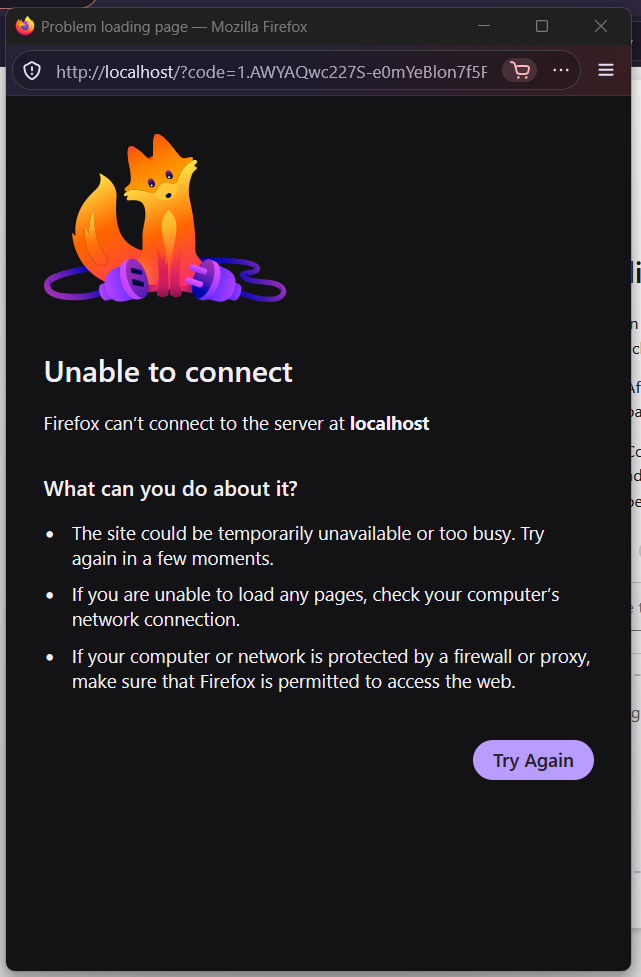
The browser redirects to the localhost URI with a valid code, but nothing is listening on that address, so it shows a "can't reach this page" error.
-
A ClickFix-style prompt tells the victim to copy that URL, or drag and drop it, back into the phishing page.
-
The attacker redeems it at /oauth2/v2.0/token from their own machine and receives an access token and a refresh token. No password, no MFA prompt, no consent screen.
The client is a public client with no secret, so the code alone redeems into tokens. It's also a first-party app, pre-consented in every tenant, so the attack lands against any user regardless of whether they've ever touched it. MFA, Conditional Access and passkeys have no effect, because Entra doesn't re-evaluate Conditional Access at code redemption, so nothing on the attacker's leg is ever tested.
Two parameters influence how damaging an interaction is:
- The redirect_uri only has to be a value the app permits, not one that resolves, so some interactions show no error at all. For example, Aadrm Admin PowerShell, as shown by NVISO.
- The code is bound to the client but not the resource, so the attacker names the resource in the scope parameter at redemption and one code pivots to whatever the client can reach. Tasos Chatziefstratiou demonstrated the same against Exchange Online. The attacker can then connect directly with Connect-ExchangeOnline -AccessToken and not trip detections looking for Graph.
Several of the abused clients belong to the Family of Client IDs (FOCI), where a refresh token issued to one family member can be exchanged for a token scoped to any other member. At time of writing the list includes Azure CLI, Azure PowerShell, Visual Studio, Teams, Whiteboard and Enterprise Roaming and Backup (Secureworks' research). ConsentFix v3 abuses exactly this, where it gains a refresh token for Azure CLI, then accesses Outlook, SharePoint, Teams and OneDrive as different family members. Blocking a single client ID doesn't contain a FOCI-issued refresh token.
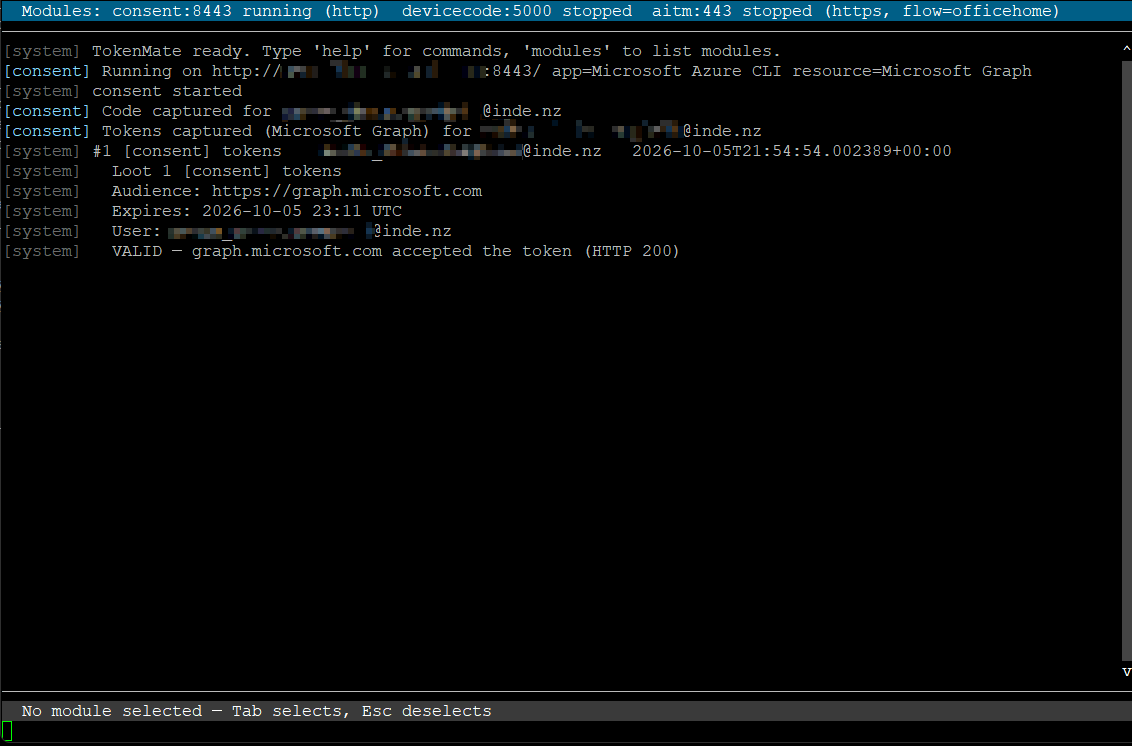
To demonstrate this technique, we’ll use one of our in-house developed toolkits, TokenMate. Development of this has heavily drawn upon learnings from the fantastic Offensive Phishing Operations Course by Maldev Academy. If learning more about practical offensive security is of interest to you, I’d highly recommend their courses.
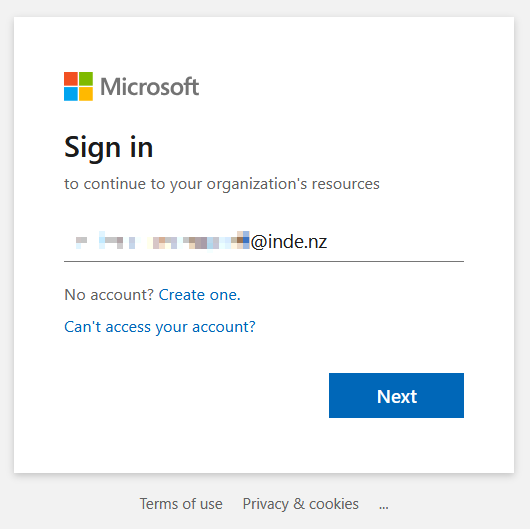
The victim is first directed to the ConsentFix kit’s URL, where they complete a standard Microsoft 365 sign-in:
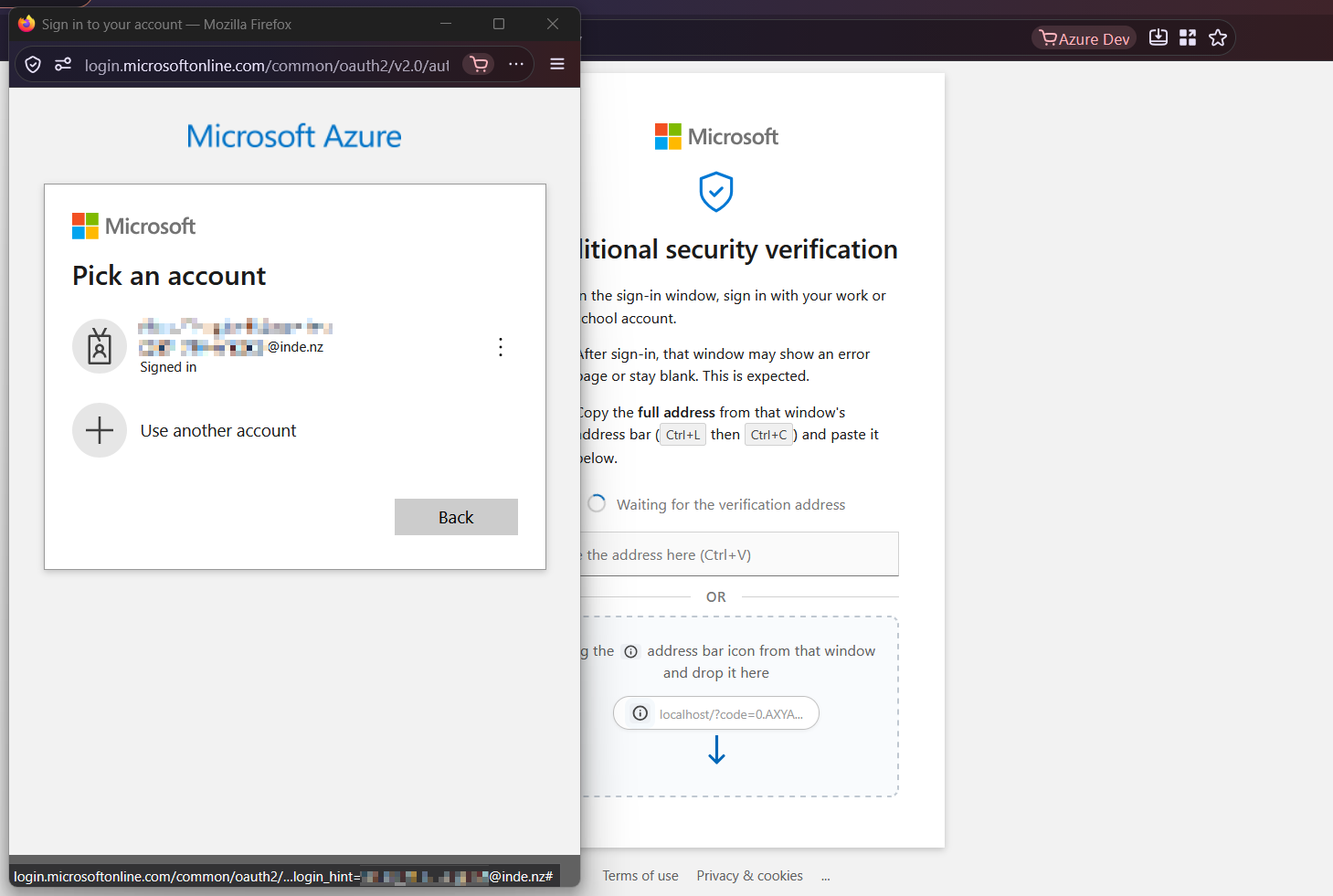
After signing in, or retrieving an existing session, they’re presented with two dialogs: the consent request popup, and the form used to collect the token:
Completing the request redirects them to a localhost prefixed URL:
As instructed by the kit, the URL is pasted into the textbox, and a success message appears before they’re redirected to a pre-defined Microsoft page:
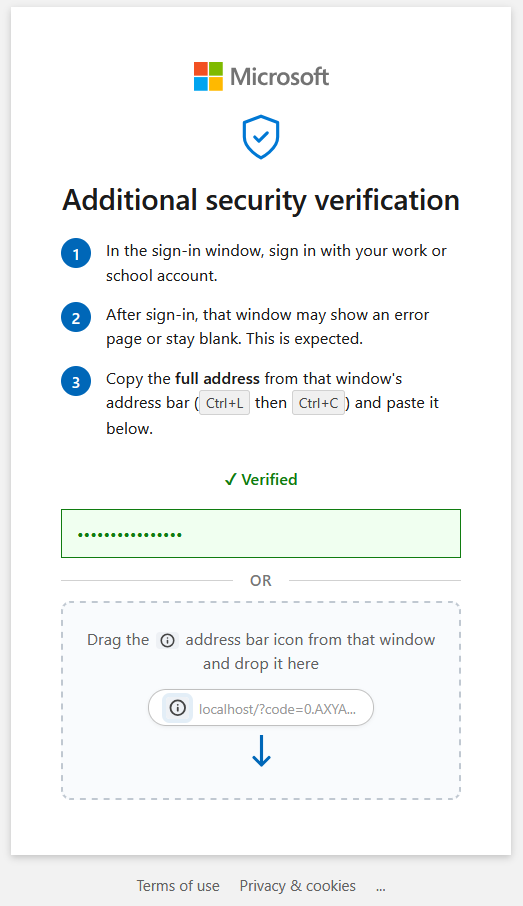 This is passed to the attacker which they use to redeem a valid token:
Device code phishing
We've covered device code phishing in detail previously, so here's the condensed version. An attacker starts a real device code request, takes the genuine user code it returns, and socially engineers a victim into entering that code at the real microsoft.com/devicelogin. The victim authenticates and completes MFA legitimately, and Microsoft issues the tokens to the session that opened the flow: the attacker's.
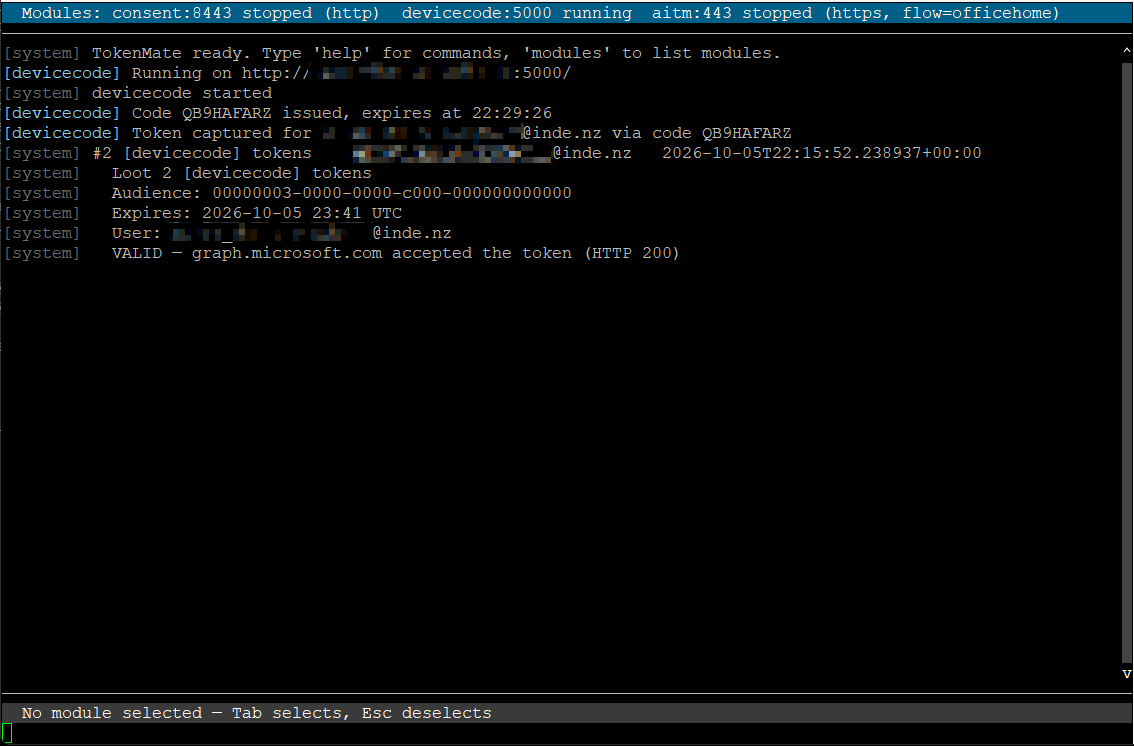
Open-source and commercially offered kits have made the technique fast and reliable. Device codes expire after around 15 minutes, so kits like Kali365 dynamically generate one the instant the victim opens the lure, keeping it valid for when they enter it. It can be run at great scale too. In September of this year Microsoft took down EvilTokens (attributed to Storm-2992) which had compromised more than 12,000 mailboxes across more than 10,000 organisations. Once the tokens land, a common pattern is to register an attacker-controlled device and mint a PRT from it, which turns a single theft into persistent access.
The device code phish begins with a landing page that then directs them to a lure, instructing them to paste a dynamically generated code into the page that follows:
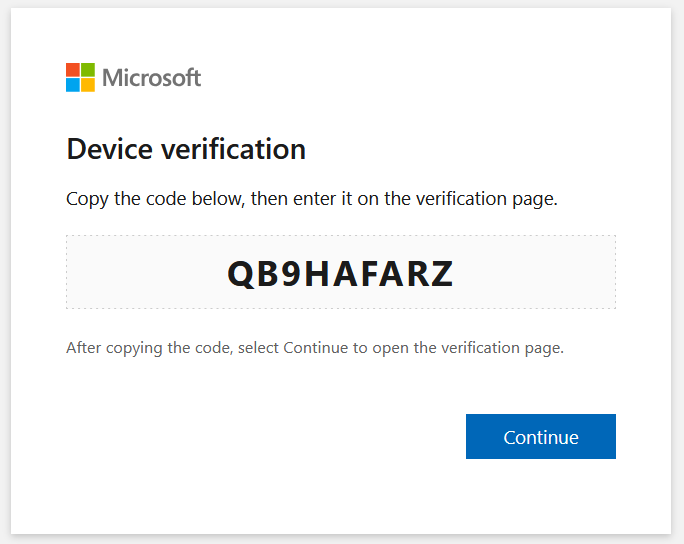
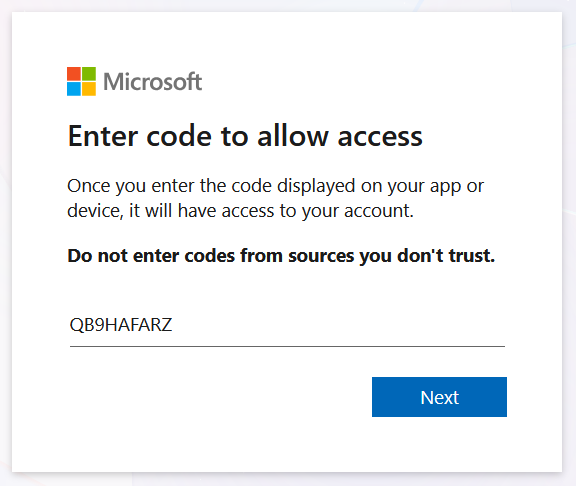
Clicking “Continue” opens the device code form, genuinely hosted by Microsoft, into which they paste the code from their clipboard:
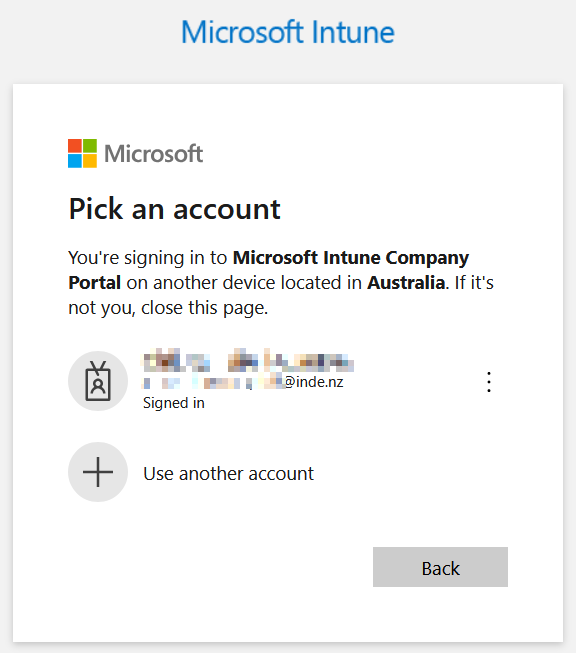
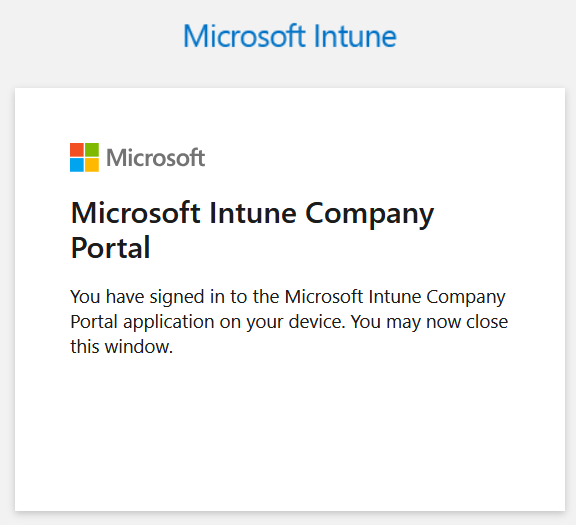
They’re then presented with a sign-in for the specific application the device code kit is configured to authenticate to. For example, Intune:
After approving the sign-in, a success message appears for the victim:
And another for the attacker:
AiTM phishing
AiTM phishing will also get the short treatment. In this scenario a reverse proxy sits between the victim and the real login page, relaying the credentials and the MFA challenge in real time, so the session cookie or refresh token can be intercepted the moment authentication completes. Neither is bound to a device, so it replays cleanly from the attacker's own infrastructure.
Like device code phishing, it is also a commodity offering. Despite attempts to take it down, Tycoon 2FA (Storm-1747) implements AiTM at scale, and Kali365 bundles it alongside device code phishing. The kits have also moved past simply replaying the stolen token. Kali365's OctoLink Live feeds the stolen refresh token into a headless Chromium instance, which makes Microsoft issue ESTSAUTH cookies, so the attacker is left with a genuine signed-in browser session and no bearer token in any header a defender would normally inspect.
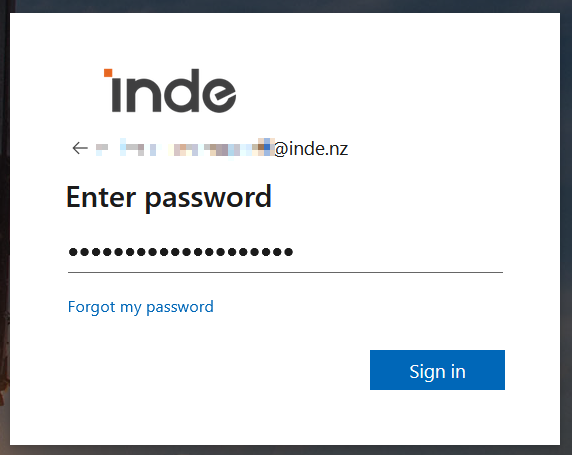
The AiTM phishing process begins with a victim being directed to the attacker-controlled proxy URL, with gates in place to prevent bot traffic. The sign-in flow begins with the standard prompt:
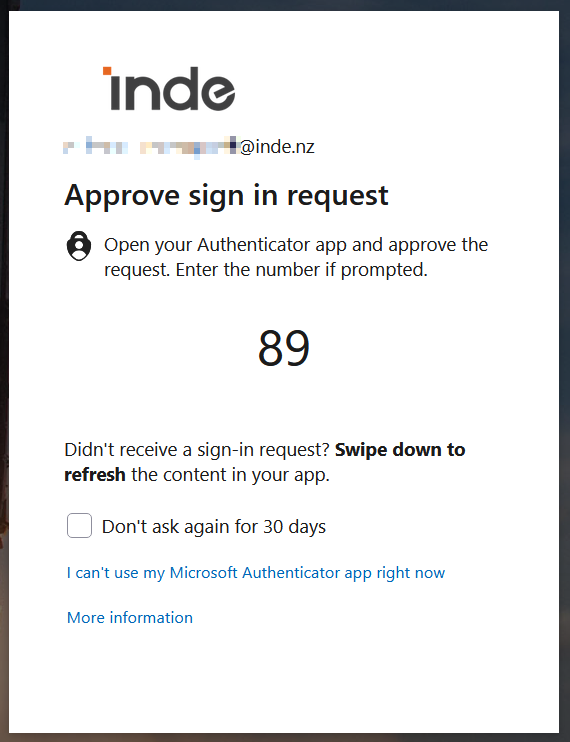
As part of that flow, an MFA prompt is sent:
Upon completion, the session is signed in and the cookies intercepted by the kit:
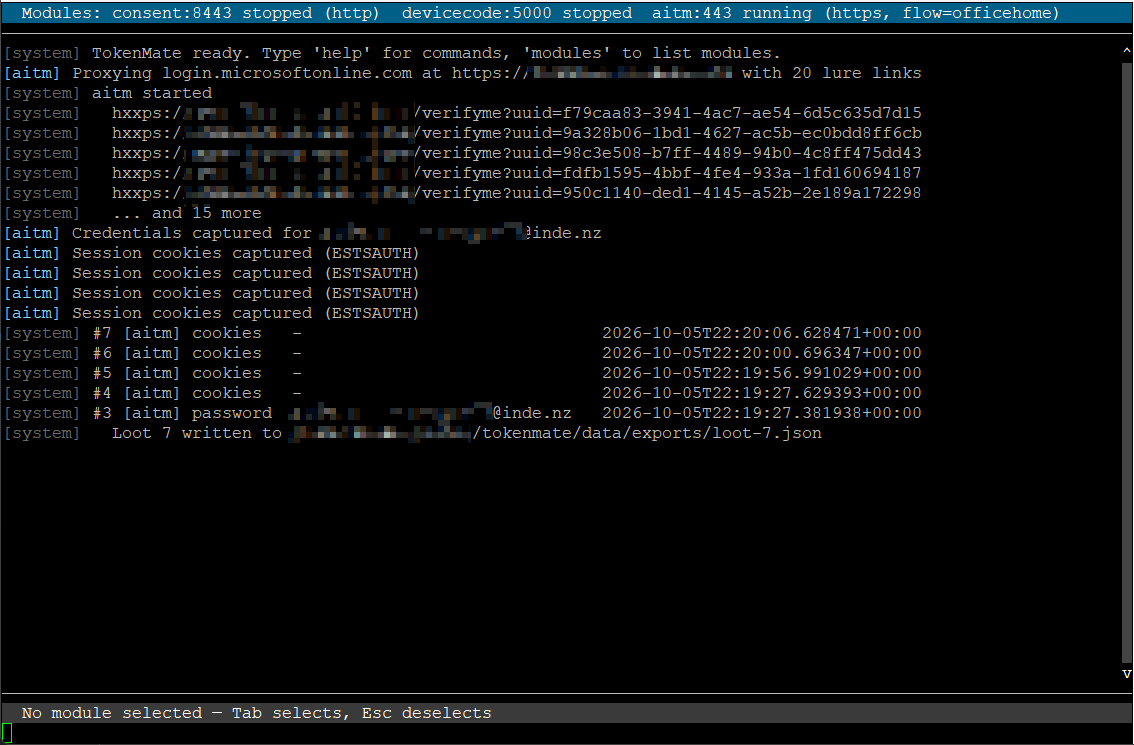
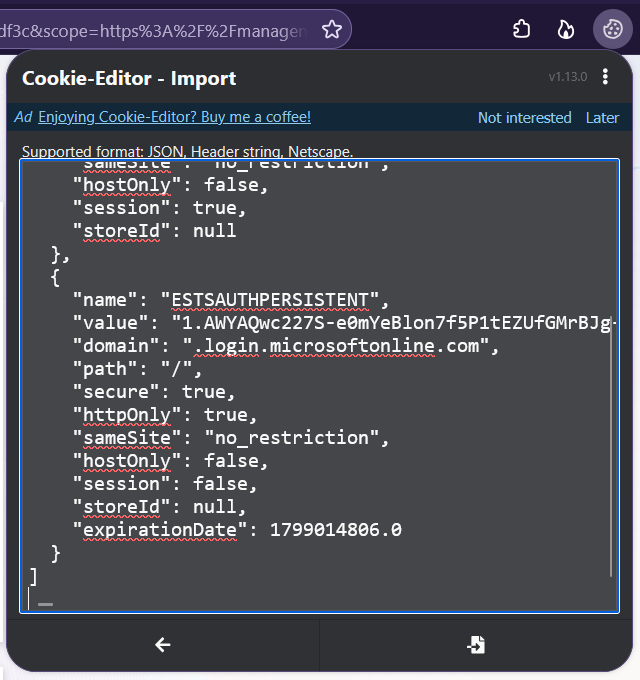
The cookies can be saved off and imported into a browser, like so:
Controls and their limitations
Two controls do most of the work here:
- Token Protection ties the token to the device, meaning possession alone is not enough.
- Compliant Network ensures token requests are coming from a network location the attacker doesn't have.
Both are missing from the common baseline we use,e and neither is straightforward to implement, which is why most tenants remain exposed to all three techniques.
Token Protection
Token Protection is a Conditional Access session control that cryptographically binds the sign-in session token to the device, using proof-of-possession through the Windows Account Manager. If the token is stolen, it cannot be redeemed from another device, even if that device is on your network. Microsoft states that this is the most secure way to protect sign-in session tokens, but there are some limitations to this:
-
It needs a PRT, meaning unregistered devices and additional identities on the device are not covered.
-
While supported by native apps on Windows and Apple platforms, browsers are currently in preview and only support ARM, with five web apps (the Azure portal, Intune admin center, Entra admin center and both Engage apps). Anything else that hits ARM is blocked if you enforce it. The preview needs Windows 11 build 26100.8246 or MDM-managed macOS and the Microsoft Single Sign-On browser extension.
-
Target resources are limited to Exchange Online, SharePoint Online and Teams on native apps, as well as Azure Virtual Desktop and Windows 365 on Windows. There is no Graph coverage.
-
Unsupported clients and devices are blocked rather than failing open. This includes Office perpetual clients, several enrolment types (Autopilot self-deploying, bulk, AVD and Windows 365 session hosts, and others), Surface Hub and Teams Rooms. They show a status code of 1003, and you'll need to identify and exclude them with a device filter.
Exchange Online, SharePoint Online and Teams vectors are protected against ConsentFix, and indirectly also Graph PowerShell (glueckkanja confirmed this in his blog post). It will not protect the Windows Azure Service Management API, which means an attacker can still use Azure CLI against ARM. For AiTM, it protects native applications but not browsers, which is usually what an AiTM attack will target. As this takes place at token issuance, it won't protect an access token that has already been issued.
Roll it out in report-only and resolve any adverse status codes before enforcing.
Compliant Network and CAE
The compliant network check is the other half of the mitigation equation, and it depends on Global Secure Access. This feature is often assumed to be an Entra Suite add-on, but the traffic profile, the check itself and Universal Tenant Restrictions are all included in Entra ID P1 and P2. The Entra Suite is only needed for the Internet Access and Private Access profiles. Once the GSA client is deployed and the Microsoft traffic profile is live, you can require token requests to come from the "All Compliant Network locations" named location. With this control in place, when the attacker tries to redeem the token, their leg fails while the victim's leg passes. On the auth plane this prevents a stolen refresh token or PRT cookie from being used outside your network, and it also has more platform support than Token Protection. Combined with CAE, you can force users to re-authenticate mid-session if they leave your network, which invalidates an access token that has already been issued.
In the ConsentFix scenario it stops the operator redeeming tokens after the fact (Graph included), but not the first token, as the victim requested that one from within your network. It will also fail if the operator is able to redeem the token from a compromised managed device that already sits on a compliant network. At that point Token Protection is your only option, and only for its supported apps.
CAE alone will not prevent these attacks, but it can reduce the impact by revoking tokens when something changes, such as an account being disabled, a password change, an administrator revoking sessions or the user becoming high risk. As long as you have location policies configured, it will also do this if a user leaves your network. CAE is enabled by default on Exchange, SharePoint and Teams, but a CAE token can still live for up to 28 hours if none of those events occur. So it can limit what an attacker does with a stolen token, but won't stop them stealing it. Resources that aren't CAE-aware can't enforce any of this mid-session, so a stolen token stays valid until it expires.
There are a few things to keep in mind when deploying it:
-
It only reads IP-based named locations.
-
If the IP ranges across your location policies exceed 5,000, it silently drops you back to one-hour tokens.
-
Use strict location mode for your policies. The baseline sets this in CA104 and CA209, and there's no report-only mode to test with.
-
You'll need to exclude Intune, Intune Enrollment and your break-glass accounts.
By excluding Intune we are technically creating a gap. Company Portal is a member of FOCI, so its refresh token can be redeemed on an unmanaged device to obtain Graph and Azure AD Graph tokens. This is the same chicken-and-egg bypass that device compliance already carries.
Device code phishing
None of these controls will stop device code phishing, as there is nothing mis-bound for them to catch. The token is issued legitimately to the attacker's own session, so Token Protection has nothing to reject, and phishing-resistant MFA won't help either. Your best option is to block the device code flow with a Conditional Access authentication flows policy. Microsoft and the FBI both recommend this, as does every write-up on kits that leverage it.
Deploy it in report-only first, then enforce it with break-glass excluded, along with any resource accounts that need device code (Teams and conference rooms, the Device Registration Service). You can find this in the baseline as CA004, which also protects against other authentication transfer methods.
Requiring a compliant device also protects against this, as the attacker's device will complete the authorisation step and fail the compliant device check. But removing the flow is better, because compliance leaves it open for anyone you exclude.
Phishing-resistant MFA and AiTM
We can use phishing-resistant MFA to stop AiTM on the front end. A FIDO2 key, passkey or Windows Hello assertion is tied to the real sign-in origin, so it won't respond to the proxy server and no token will be issued. It won't help once a token exists, so use it in front of the token binding controls rather than instead of them. Make sure you forbid the weaker methods for valuable accounts too, otherwise the proxy will just fail back to one of those. This is found in the baseline as CA105, applied only to administrators.
Again, requiring a compliant device will also protect against AiTM at the sign-in stage, but it won't stop someone stealing a PRT cookie from a compliant device as the cookie replays with the compliance claim already attached.
Limiting what ConsentFix can target
You can limit the pre-consented applications that ConsentFix can target by requiring user assignment on their service principals, or by blocking the client IDs outright. Entra evaluates this before Conditional Access. You'll have to identify every user running CLI tools or PowerShell first and also remember that FOCI will still let an attacker target other applications in the family if you only block one.
A cheaper option is to block the Windows Azure Service Management API for all users that aren't Azure admins. Of the four back-end APIs the code redeems against, it's the only one a standard user shouldn't need.
Microsoft has also reduced the lifetime of the authorisation code from about 10 minutes to about 1 minute. This will slow down an attacker doing it by hand, but an automated back end like Pipedream will have no issues redeeming it.
Risk policies and app consent
Risk policies with CAE are the last resort, for when the attacker was able to reach your compliant network after all. However, app consent policy won't protect you from ConsentFix. The older illicit-grant technique at least left an enterprise application you could audit and remove, whereas ConsentFix doesn't register anything with your tenant, so there's nothing for consent policy to target.
Mapping the controls to each technique
When we map the controls to each technique, we start to see where we fall short:
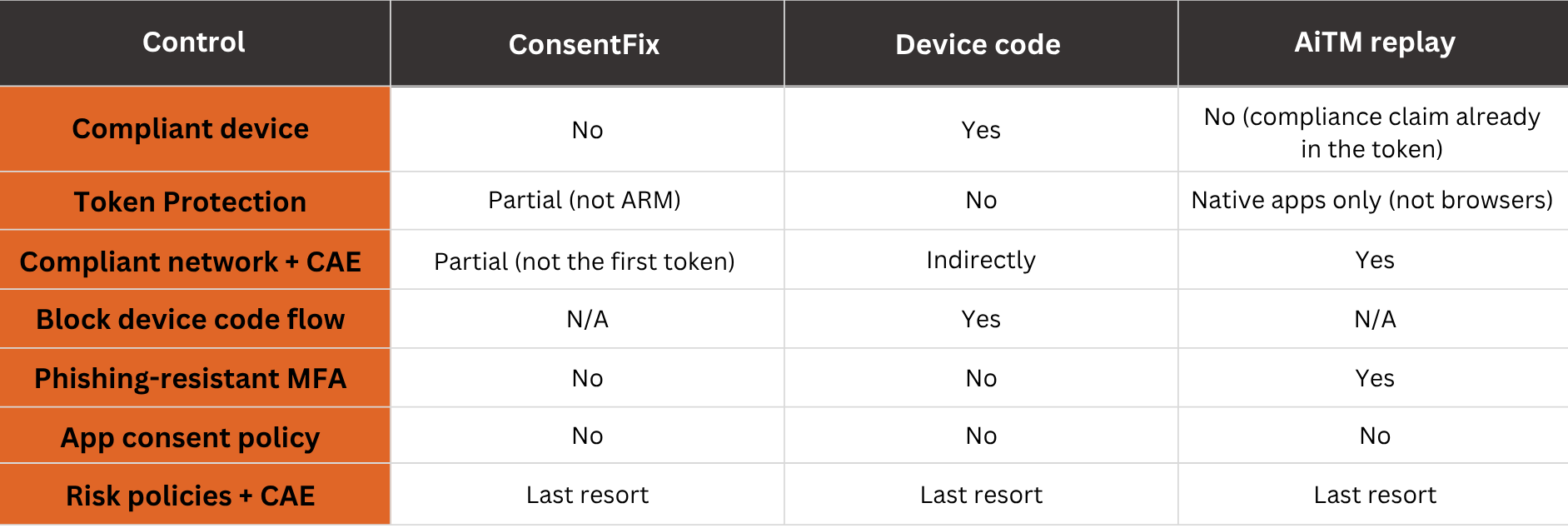
ConsentFix primarily targets Graph, and Token Protection doesn't protect against Graph. None of these controls will provide you coverage the board, which is why a defense in depth is a non-negotiable approach.
Detection
Prevention narrows the doorway, and detection is how you know something came through it. Our experience has been that while Entra ID Protection and Defender XDR offer detections across all three techniques (anomalous token, attacker in the middle, stolen session cookie, etc), real-world performance is hugely inconsistent. The queries that follow have worked for many cases of each, but do carry both a risk of returning false positives and being fragile due to the sheer number of variables available to the AiTM and ConsentFix techniques.
Device code
This is the easiest to detect, as long as you've blocked the flow. The query returns every successful device code authentication over the last day, minus accounts you list as exceptions (Teams Rooms and shared device resource accounts). With the flow blocked, a success result means an exclusion fired or someone fell outside the policy, and the ConditionalAccessStatus column shows what Conditional Access did.
let lookback = 1d;
let excludedUsers = dynamic([
// e.g. Teams Rooms / shared device resource accounts
]);
SigninLogs
| where TimeGenerated > ago(lookback)
| where AuthenticationProtocol =~ "deviceCode"
| where ResultType == "0"
| where UserPrincipalName !in~ (excludedUsers)
| project
 TimeGenerated,
 UserPrincipalName,
 AppDisplayName,
 AppId,
 ResourceDisplayName,
 IPAddress,
 ASN = AutonomousSystemNumber,
 Location,
 UserAgent,
 DeviceDetail,
 ConditionalAccessStatus,
 SessionId,
 CorrelationId
| sort by TimeGenerated desc
ConsentFix
There's really no great detection for this, at least not with sign-in logs alone. The attack generates two events:
- The victim's interactive sign-in to the abused app in SigninLogs
- The attacker's redemption, in the non-interactive logs as a fresh authorisation-code grant.
Both are tied to the same session. The following query pairs them and alerts where the redemption came from a different IP, ASN or country than the victim's sign-in. This does create a gap where an attacker redeems through the victim's own egress, making it indistinguishable from a legitimate sign-in.
let lookback = 1d;
let redemptionWindow = 10m;
let ingestionDelay = 30m;
let exposedApps = dynamic([
 "04b07795-8ddb-461a-bbee-02f9e1bf7b46", // Azure CLI
 "1950a258-227b-4e31-a9cf-717495945fc2", // Azure PowerShell
 "14d82eec-204b-4c2f-b7e8-296a70dab67e", // Graph CLI
 "9bc3ab49-b65d-410a-85ad-de819febfddc", // SharePoint Online Management Shell
 "12128f48-ec9e-42f0-b203-ea49fb6af367", // Teams PowerShell
 "aebc6443-996d-45c2-90f0-388ff96faa56", // VS Code
 "872cd9fa-d31f-45e0-9eab-6e460a02d1f1", // Visual Studio
 "a672d62c-fc7b-4e81-a576-e60dc46e951d", // Power Query for Excel
 "90f610bf-206d-4950-b61d-37fa6fd1b224", // Aadrm Admin Powershell
 "60c8bde5-3167-4f92-8fdb-059f6176dc0f", // Enterprise Roaming and Backup
 "9ba1a5c7-f17a-4de9-a1f1-6178c8d51223" // Intune Company Portal
]);
let origins = SigninLogs
 | where TimeGenerated > ago(lookback + redemptionWindow + ingestionDelay)
 | where ResultType == "0" and AppId in~ (exposedApps)
 | where isnotempty(SessionId)
 | summarize arg_max(CreatedDateTime, *) by UserId, AppId, SessionId
 | project
 UserId,
 AppId,
 SessionId,
 OriginTime = CreatedDateTime,
 OriginIP = IPAddress,
 OriginASN = tostring(AutonomousSystemNumber),
 OriginCountry = Location;
AADNonInteractiveUserSignInLogs
| where TimeGenerated > ago(lookback)
| where ResultType == "0" and AppId in~ (exposedApps)
| where IncomingTokenType =~ "none" and isnotempty(SessionId)
| summarize arg_min(CreatedDateTime, *) by UserId, AppId, SessionId
| project
 UserId,
 AppId,
 SessionId,
 UserPrincipalName,
 AppDisplayName,
 RedemptionTime = CreatedDateTime,
 RedemptionIP = IPAddress,
 RedemptionASN = tostring(AutonomousSystemNumber),
 RedemptionCountry = Location,
 RedemptionUA = UserAgent
| join kind = inner origins on UserId, AppId, SessionId
| where RedemptionTime > OriginTime and RedemptionTime <= OriginTime + redemptionWindow
| where OriginIP != RedemptionIP or OriginASN != RedemptionASN or OriginCountry != RedemptionCountry
| project
 RedemptionTime,
 OriginTime,
 UserPrincipalName,
 AppDisplayName,
 OriginIP,
 RedemptionIP,
 OriginASN,
 RedemptionASN,
 OriginCountry,
 RedemptionCountry,
 RedemptionUA,
 SessionId
| sort by RedemptionTime desc
AiTM
This query identifies a session that moves outside of an established baseline. It finds an origin that looks phished (an unmanaged device, on an unfamiliar network), then looks for activity on the same SessionId from a different ASN within a 4 hour window. It also checks there's no MFA in the authentication details, because a stolen session doesn't re-run MFA. As with ConsentFix, you won't detect a replay from the same network the session started on.
let lookback = 14d;
let detectionWindow = 1d;
let minOrgASNUsers = 5;
let minOrgASNDays = 7;
let maxReplayDelay = 4h;
let maxSetSize = 100;
let signins = SigninLogs
 | where TimeGenerated > ago(lookback)
 | project
 TimeGenerated,
 UserPrincipalName,
 SessionId,
 ResultType,
 AuthenticationDetails,
 AppDisplayName,
 IPAddress,
 ASN = AutonomousSystemNumber,
 Location,
 UserAgent,
 Managed = isnotempty(tostring(DeviceDetail.deviceId));
let asnDays = materialize (
 signins
 | where ResultType == "0"
 | summarize Managed = max(Managed) by UserPrincipalName, ASN, Day = startofday(TimeGenerated));
let orgASNs = asnDays
 | where Managed and isnotempty(ASN)
 | summarize Users = dcount(UserPrincipalName), Days = dcount(Day) by ASN
 | where Users >= minOrgASNUsers and Days >= minOrgASNDays;
let origins = signins
 | where isnotempty(SessionId)
 | summarize
 (OriginTime, OriginIP, OriginASN, OriginCountry, OriginUA, OriginManaged) =
 arg_min(TimeGenerated, IPAddress, ASN, Location, UserAgent, Managed)
 by UserPrincipalName, SessionId
 | where OriginTime > ago(detectionWindow + maxReplayDelay)
 and not(OriginManaged)
 and OriginASN !in(orgASNs)
 | join kind = leftouter asnDays on UserPrincipalName
 | summarize
 take_any(OriginTime, OriginIP, OriginASN, OriginCountry, OriginUA),
 KnownASNs = make_set_if(ASN, Day < startofday(OriginTime), maxSetSize)
 by UserPrincipalName, SessionId
 | where not(set_has_element(KnownASNs, OriginASN));
signins
| where TimeGenerated > ago(detectionWindow) and ResultType == "0"
| where not(AuthenticationDetails has_any("MFA completed", "MFA successfully completed"))
| join kind = inner origins on UserPrincipalName, SessionId
| where ASN != OriginASN
| summarize
 take_any(OriginTime, OriginIP, OriginASN, OriginCountry, KnownASNs),
 FirstReplay = min(TimeGenerated),
 (LastReplay, LastReplayIP) = arg_max(TimeGenerated, IPAddress),
 ReplayEvents = count(),
 UAMismatches = countif(UserAgent != OriginUA),
 ReplayIPs = make_set(IPAddress, maxSetSize),
 ReplayASNs = make_set(ASN, maxSetSize),
 ReplayApps = make_set(AppDisplayName, maxSetSize)
 by UserPrincipalName, SessionId
| where FirstReplay - OriginTime <= maxReplayDelay
| extend NewReplayASNs = set_difference(ReplayASNs, KnownASNs)
Order of operations
These controls don't substitute for one another. Blocking the device code flow stops device code phishing and does nothing for ConsentFix or AiTM, and phishing-resistant MFA stops AiTM and nothing else, so a half-finished rollout leaves whole techniques open. Here is the order we work through them with customers:
- Stand up a sound Conditional Access baseline, building from a reputable source such as j0eyv's or comparing your existing policies against it. The device code flow should be blocked here (CA004), and phishing-resistant MFA required for your admins (CA105). Exclude your break-glass accounts from every policy, and start each one in report-only where that is supported before moving it to block with as few exceptions as possible.
- Confirm the baseline isn't being silently bypassed. Until Microsoft's June 2026 rollout, an "All resources" policy with any resource exclusion skipped sign-ins that requested only the baseline scopes (openid, profile, email, offline_access, User.Read and friends), which are exactly what Azure CLI and VS Code ask for. A tenant left on the legacy "Customize behavior" option still has that gap, so check the baseline scopes setting before you trust any of it.
- Build the two policies the baseline leaves out: the compliant-network block and the Token Protection session control. Start them in report-only, work through what they flag, then move them to block.
- Apply the easy ConsentFix wins. Block the Windows Azure Service Management API for anyone outside your Azure admins, and restrict the first-party CLI and developer apps to the people who actually run them.
- Schedule the three detection queries, to catch what the controls above let through.
Even with all of these controls enforced, you can still expect some attacks to get through. When one does, it may be a variant that works around the discussed limitations, which calls for using your Sentinel telemetry to guide new policy or detections. Or, it may be that you have to rely on detections and mitigations beyond the Entra layer.